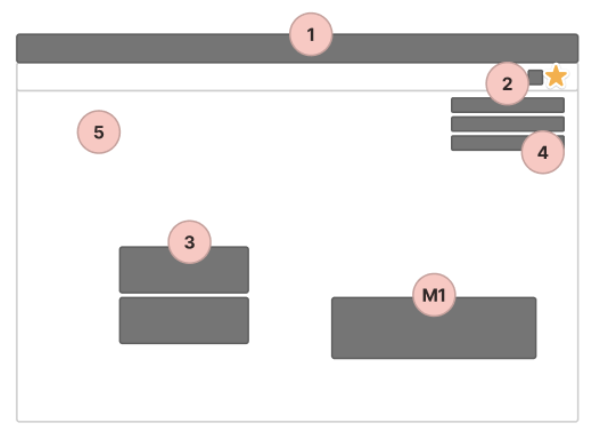
1 – Top – System info.
2 – Header
• Bell/Clock – MeddelandeCenter
• User
• Support
3 – ToDo – Endast jobb. Ej marketing
4 – Toast, Info
5 – Tips/Internal Marketing, Glasspinnen
M1 – Marketing, Frontpage
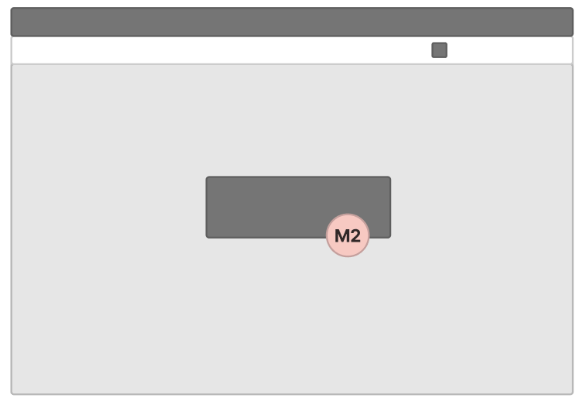
M2 – In tool info. – Listslut …
Top – System info
xxxxxx
Header
Bell / Klocka – Meddelande-/notiscenter
xxxxxx
User
xxxxxx
Support
xxxxxx
Målbild, Header-meny

Frångå stökig header – Mål, förenkla och fokus

ToDo – Endast jobb, ej marketing
xxxxxx
Toast, info
xxxxxx
Tips/Internal Marketing/Glasspinnen
xxxxxx
M1 – Marketing, Dashboard (start)
xxxxxx
M2 – In tool marketing – Ex. listslut
xxxxxx
What (Content)
Relevant information vid rätt tillfälle
- Information
- Information + Action (Link / Yes-No …)
Entity
- Product
- User
- Private / Personal
- Logged in user
- Open / Company
- System
- Critical
- Error
- Warning
- Info
When
NÄR visar vi det som är viktigt?
- Date
- Range
- High
- Alerts (immediate attention Required)
- Errors (immediate action Required)
- Exceptions (System anomalies, something didn’t work)
- Confirmations (potentially destructive actions that need user confirmation to proceed)
- Mid
- Warnings (no immediate action required)
- Acknowledgements (feedback on user actions)
- Success messages
- Low
- Informational messages (aka passive notifications, something is ready to view)
- Badges (typically on icons, signifying something new since last interaction)
- Status indicators (system feedback)
Where
- Geo (Device)
- Desktop
- Tablet
- Mobile
- Push
- Area (Placement
Underlag ToDo
Vad är en ToDo
xx
Vad definiera och utmärker nivåer, ToDo alt Kort
xx
ToDo – En arbetslista
xx